PILAR automatically applies the standard values from the TSV file.
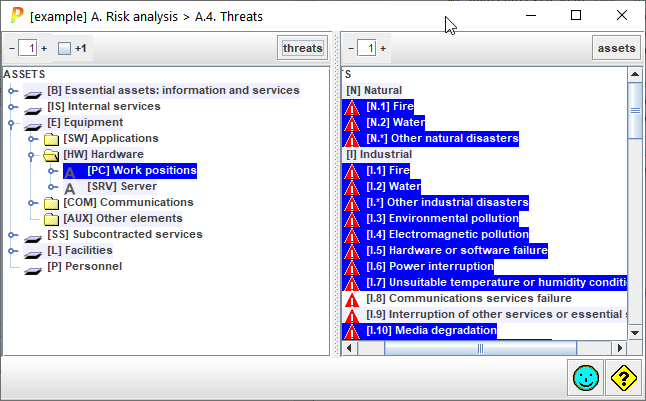
Top toolbar
|
|
Spinner to control the expansion of the assets tree. |
|
+1 |
Adjust the effect of the spinner. If +1 is checked, PILAR shows the threats associated to an asset. If unchecked, the threats are not expanded. |
|
threats |
— Select one or more assets in the left panel. — Click THREATS. PILAR selects on the right panel the threats that are associated to the selected assets. |
|
|
Spinner to control the expansion of the threats tree. |
|
assets |
— Select one or more threats in the right panel. — Click ASSETS. PILAR selects on the left panel, the assets that are associated to the selected threats. |

Which threats are associated to an asset?
- select the asset on the left (one or more)
- click THREATS
Which assets are subject to a threat?
- select the threat on the right (one or more)
- click ASSETS