|
Quick start |
|
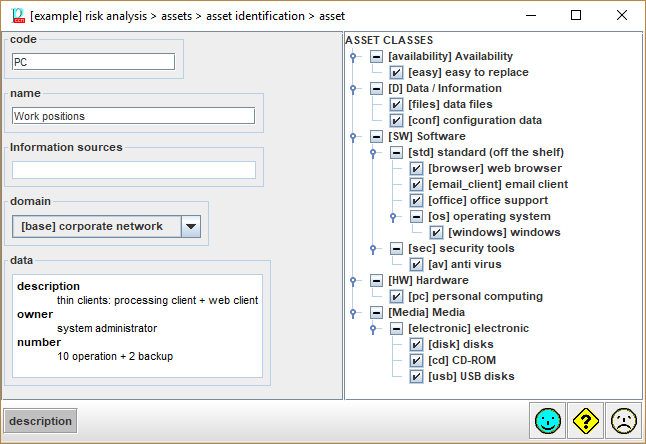
Select a unique code and a descriptive name. Check on one or more classes on the right panel. Click STANDARD and add some descriptive information. Click OK to continue. |
|
which shall be unique. |
|
|
name |
A short description: one line. |
|
sources |
Click to associate the asset to zero or more information sources. |
|
domain |
Select the security domain to which the asset belongs. |
|
description |
A longer description. The description may include hyperlinks (URLs). To go to the linked
page RIGHT-CLICK, then |

Key-value pairs to describe the asset. It is just for administrative purposes.
On double click, an editing window opens
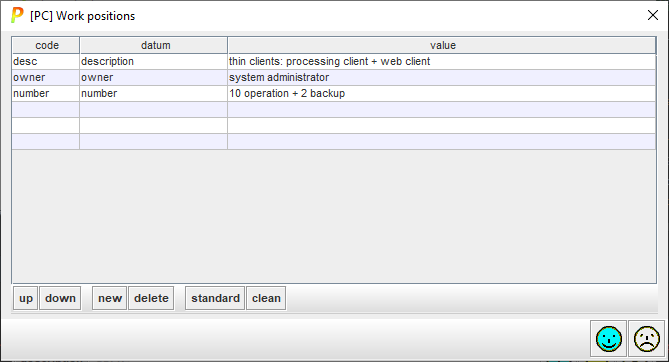
· Click on the code column to edit a code. The code is useful for translations.
· Click on the datum column to edit a name
·
Click on the value column to
edit a value.
Operations on the key-value pairs:
· up – moves the selected row upwards
· down – moves the selected row downwards
· new – adds one more row
· delete – removes the selected row
·
standard – adds standard keys, considering
the classes marked
See info file.
· clean – removes the rows that have no contents in the value field