When you right-click on the safeguards tree, you may …
Presents a domain-phase view of the maturity values. See below.
copy
The code and name of the safeguard are copied onto the clipboard.
copy path
The code and name of the safeguard, and all her ancestors, are copied onto the clipboard.
full text
The code and name of the safeguard are presented in a new window.
full path
The code and name of the safeguard, and all her ancestors, are presented in a new window.
close father
The father of this node in the tree is collapsed.
close brothers
This node, and its brothers in the tree, are collapsed.
…
On some safeguards, PILAR can provide some more information.
When a safeguard is from SP800-53, or there is a relation to a security measure in SP800-53, PILAR jumps to the corresponding web information page. Since the web URL may change, the base URL can be modified in the configuration file:
bib_xx/hooks-sp800-53.json
additional information
Some more information for the safeguard is displayed in a new window.
See “Safeguards / Additional information”
Domain-phase view. Clicking on a safeguard (right click > EDIT) you may have a one-safeguard view of maturity values covering all the domains and all the phases
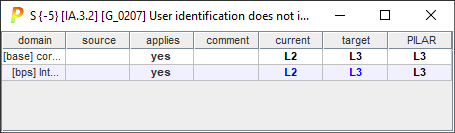
User values are in black over white; while calculated values are in cyan.