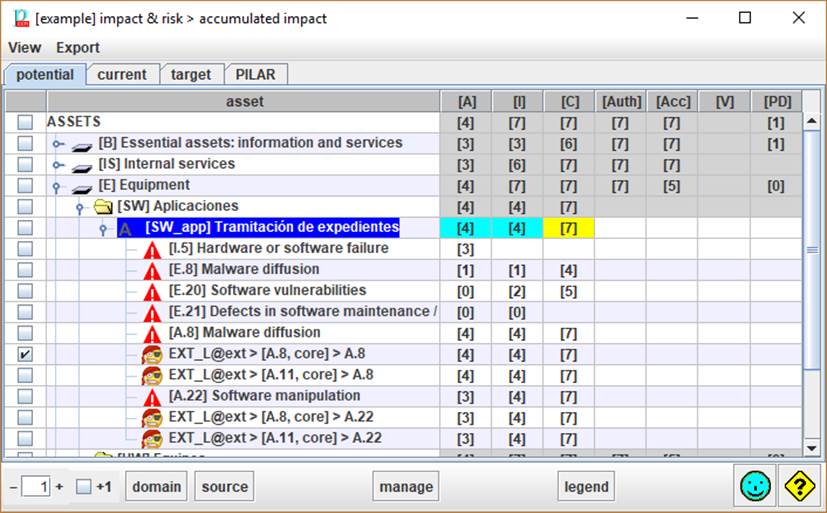
There is one tab per project phase. Click to switch.
Pseudo phase “potential” shows inherent impact without safeguards.
Top menu VIEW
|
layers |
tree organized by layers, then assets |
|
logical
zones |
tree organized by logical zones, then assets |
|
physical
zones |
tree organized by physical zones, then assets |
|
threats |
tree organized by threats, then assets |
Top menu EXPORT
|
html |
Exports selected rows to an html file for the web. |
|
csv |
Exports selected rows to a csv file for excel. |
|
xml |
Exports values to an xml file. |
|
db |
Exports values to a database. Only if the license enables the usage of SQL. |
Table columns
|
selection |
Click on checkboxes to check / uncheck. SHIFT-click to check a range. Click on column header to clear current selection. Selects rows to manage (see below) |
|
assets |
Assets and threats |
|
dimensions |
One column per security dimension. Click on header to switch to alternate view |
|
|
Impact value. Impacts are evaluated on threats, and summarised for assets, groups of assets, layers, and whole project. |
Bottom toolbar

|
|
Spinner to control the expansion of the assets tree. Expands down to assets. If [+1]is selected, it further expands threats. |
|
+1 |
Modifier for assets tree expansion. If checked, threats are expanded. |
|
domain |
Select a security domain and PILAR will select the assets that belong to it. |
|
source |
Select one or more information sources and PILAR will select the assets associated to them. |
|
manage |
For the rows selected in column 1, PILAR collects the risks, and jumps to the screen, considering only the selected risks. |
|
legend |
displays impact levels and colours |
