You may specify a different dependency degree for each dimension of security. To do so, on the panel to edit asset dependencies, click the right button to jump into a new window where you may establish a precise dependency degree for each dimension.
Typical values are as follow:
|
N |
none |
0% |
no dependency |
|
L |
low |
1% |
academic – barely meaningful |
|
M |
medium |
10% |
meaningful, though not very much |
|
H |
high |
50% |
I do not know ... |
|
VH |
very high |
90% |
nearly complete |
|
T |
total |
100% |
full dependency |
Click the right mouse button on the dependency you wish to modify:
— set all the same percentage is applied to every dimension
— set only 100% for the selected dimension, 0% for the others
— set 100% for the selected dimension, leave the other unmodified
— unset 0% for the selected dimension, leave the other unmodified
— details open the editing window
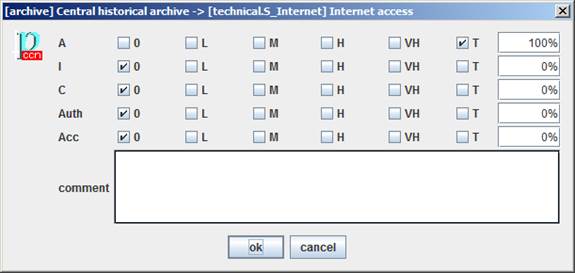
When you leave the editing window, the dependency degree appears on the dependencies tree using a compact notation. Let's show a few examples:
|
expression |
meaning |
|
A:100% |
the dependency is only for the
availability dimension; e.g. when a VPN stops the need to protect confidentiality any longer |
|
I:100% / C:100% |
the dependency is only for the
integrity and confidentiality dimensions; e.g. when a redundant equipment guarantees availability |
The format may be described as
expression ::= { one_dimension }0+
one_dimension ::= ACRONYM ':' percent '/'
When an expression is presented, all dimensions have a 0% dependency degree, except those explicitly stated.