This approach provides a quick but imprecise assessment common for all the assets in each domain. It is faster than the evaluation by dependencies. Using this method, all assets in the domain receive the same values.
Nevertheless, some assets may be independent from the domain values. Use qualifier [independent] in asset classes.
The value of the information system is established for domains. The value is assigned to the essential assets (information and services) and transferred to the domain that hosts it, and to the domains that are associated to the essential asset.
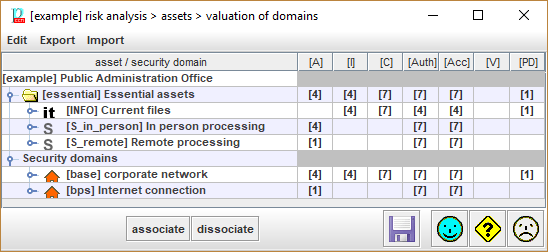
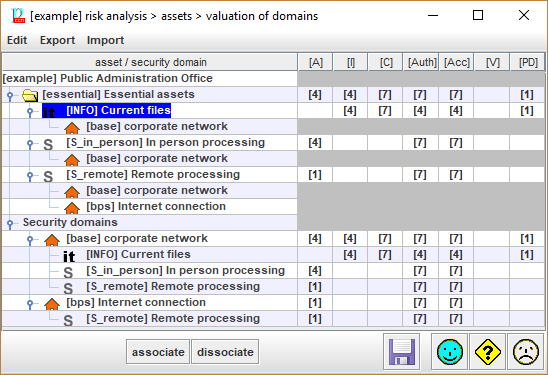
You may better understand what is going on by displaying the association of assets to domains (and vice versa, of domains to assets):
|
|
Select one or more value cells. Copy values to be pasted. |
|
|
Select one or more destination cells. Paste the copied values. If the source range is 1 cell, and the destination covers several cells, the value is copied into all of them. |


Top menu EXPORT
|
to CSV |
CSV – comma separated values; for excel |
|
to XML |
XML – extensible markup language |
Top menu IMPORT
|
from XML |
XML – extensible markup language |
Table - As many columns as security dimensions:
For each essential asset and each dimension, the value.
· See Assets / Valuation / qualitative
· See Assets / Valuation / quantitative
For each security domain, the value inherited from the essential assets associated to it.
|
associate |
Select one asset and one domain. Click to associate. Assets are always associated to their domain. You may associate to more domains. |
|
dissociate |
Select one asset and one domain. Click to dissociate. You may never dissociate an asset from its domain. |
Typically, information assets require to protect confidentiality, integrity, authenticity and traceability, while services add requirements in terms of availability.
The value of the system is the largest value of those for any information or service.
Each domain inherits the valuation of the essential assets associated to it.
To associate an asset to a domain
§ select the asset
§ select the domain
§ click ASSOCIATE
To disassociate an asset for a domain
§ select the asset
§ select the domain