This screen qualifies domains with a number of characteristics. The effect is to modify the standard values assigned from threat profile files.
If you modify the associations in this window, please, re-apply the library, or another TSV file (see “Valuation of threats”. TSV is applied automatically if threats are set to automatic (see Options / Threats).
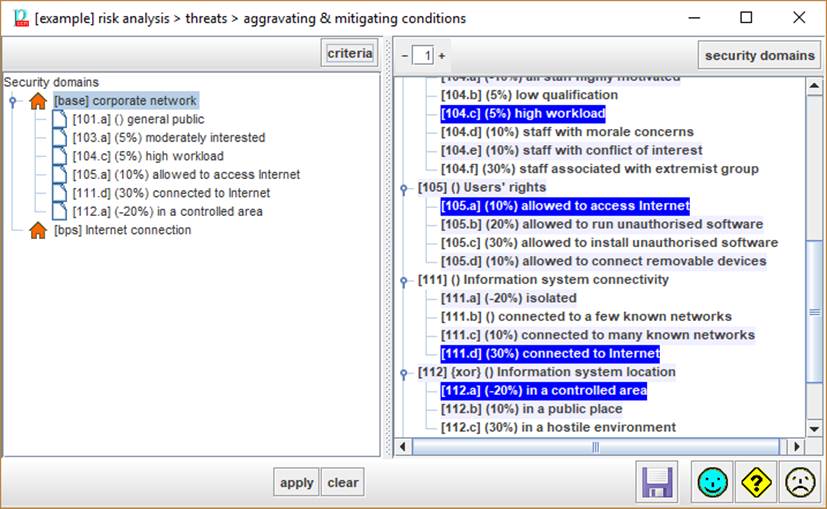
|
criteria |
Select one security domain in the left panel. Click CRITERIA and PILAR will select in the right panel the criteria applying to the selected domain. |
|
|
Control the level of expansion of the criteria tree. |
|
security domains |
Select one criterion in the left panel. Click DOMAINS and PILAR will select the security domains in the right panel where the criterion applies. |

Bottom
toolbar
|
apply |
Select one or more security domains in the left panel. Select one or more criteria in the right panel. Click APPLY to associate. |
|
clear |
Select one or more security domains in the left panel. Select one or more criteria in the right panel. Click CLEAR to dissociate. |
|
|
Saves current project either in a file, or in database (according to its source). |

To
associate a criterion to a domain
- select the domain (left panel)
- select the criterion (right panel)
- click APPLY
To remove a criterion association
- select the criterion (on the left panel)
- click CLEAR
To discover the criteria associated to a
domain
- select the domain (on the left panel)
- click criteria (left panel, top)
To discover the domains subject to a
vulnerability
- select the criterion (on the right panel)
- click DOMAINS (right panel, top)