It is a relevant document for some auditors and auditing practices. It collects the safeguards that apply or not.
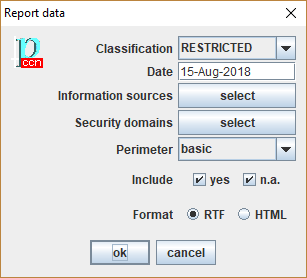
It is important to know what applies in order to focus inspection on those that apply.
It is also important to know what does not apply, since auditors might disagree.
Sometimes, “n.a.” means that the safeguard would apply, but it is not justified (the risk does not justify the resources needed).
Fields explained:
|
Classification |
Establishes the marking of the report. A minimal marking is established in the Project data. Here you can raise it. |
|
Date |
Default date for the report is TODAY. |
|
Information sources |
if marked, filter by information source |
|
Security domains |
You may select a few security domains to be used in the report. By default, all domains are printed. |
|
Perimeter |
See Perimeters |
|
Include |
You may include the safeguards that apply, those that do not apply, or all of them |
|
Format |
PILAR generates either RTF for documents, or HTML for intranet. |