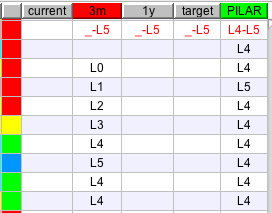
The traffic light gives a fast indication on whether the level of maturity is enough or not.
To calculate the colour of the light, PILAR uses 2 references:
GREEN:
target maturity
§ click the right button at the header of the phase to use as target
the head of the selected column is painted GREEN
RED:
assessed maturity
§ click on the header of the phase you want to evaluate
the header of the selected phase becomes RED
Using the above information, PILAR chooses a colour:
|
traffic light colour code |
|
|
BLUE |
if the maturity at the RED phase is higher than the maturity at the GREEN phase |
|
GREEN |
RED maturity is aligned with target |
|
YELLOW |
the RED maturity is poor: should be enhanced |
|
RED |
the RED maturity is too poor: must be enhanced |
|
GREY |
if the safeguard does not apply |
|
Here you have an example. The red phase, 3m is the assessed phase. The green phase, PILAR, is the target phase. The traffic lights, first column, follow the difference between phases red and green. |
|