For the controls and safeguards that apply, you may specify a valuation in each project phase.
For elements without sub elements, a simple value is presented; e.g. L3.
For elements with sub elements (expandable), a range is presented.
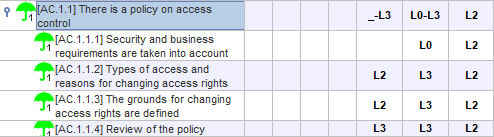
When the element is a control or safety measure, PILAR distinguishes between a technical assessment and an official assessment. The technical evaluation is calculated by PILAR from the associated safeguards and is presented within parentheses. The official evaluation is introduced by the user and is presented outside the parentheses. Each of these ratings can be a simple value or a range. When the official assessment and technique are the same, only the official one is presented. For example
L3 (L3) is simplified to L3
For example:
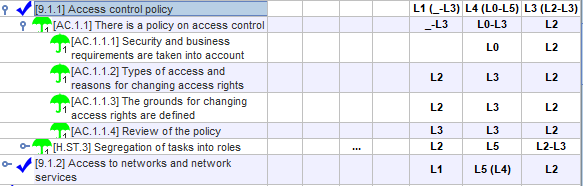
PILAR offers some shortcuts to quickly evaluate a set of measures and safeguards:
· when a safeguard with sub elements is valued,
the value is propagated to the sub elements
·
when a
measure with sub elements is valued, the value is propagated to the sub
elements, in a controlled manner
o
if the
sub-element is another measure, it propagates
o
if the sub-element is a
reference to a safeguard, it depends on the configuration option Risk treatment
·
the values
of the measures can be manually "pushed down" to the sub-elements
· the values of the safeguards can be manually
"pulled up" to the measures.
The simplest way to proceed is to let the PILAR itself propagate the maturity values from the controls to the safeguards and vice versa. This automation can be selected in the Risk treatment panel.
In XOR type elements, we must indicate which option is selected within the possible ones.
On the valuation cells, you may move maturity value from one phase, security domain, or project, to another:
copy tree
PILAR copies the maturity of the cells in the current row, and in the corresponding sub-tree, to be pasted later
paste tree
PILAR pastes the values copied before
Note that the values can go from one phase to another phase, from one domain to another, and even from one project to another project; but they always apply to the same sub-tree.
Please, note as well that copy-paste only works within the application. You may not copy in PILAR and paste in another application.