To manage the association of assets to information sources.
The left panel show the asset tree. The right panel, the information sources.
TBD
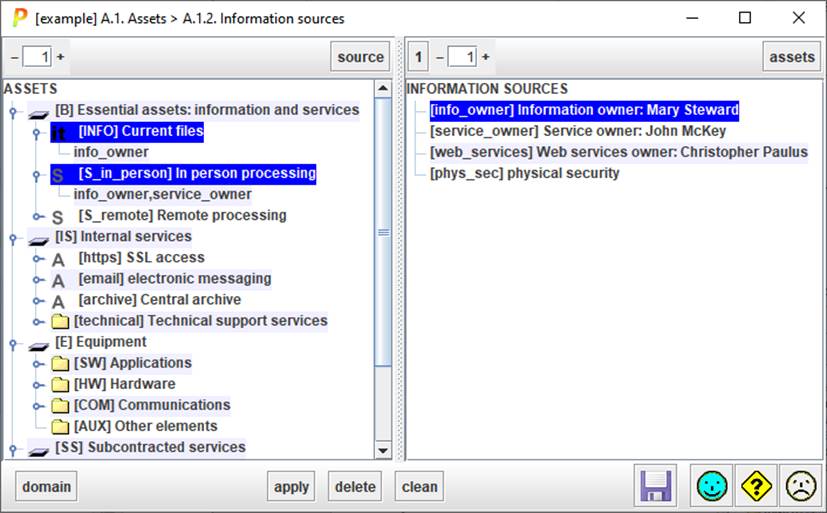
Top left
|
|
Controls the level of expansion of the left tree (assets). |
|
SOURCE |
Select one or more assets on the left. Click SOURCE, and PILAR will select the associated information sources on the right. |

Top right
|
|
Controls the level of expansion of the right tree (information sources). |
|
ASSETS |
Select one or more information sources on the right. Click ASSETS, and PILAR will select the associated assets on the left tree. |
Bottom
|
DOMAIN |
Select assets in left panel that belong to the given domain |
|
APPLY |
Select one or more assets on the left. Select one or more sources
on the right. Click APPLY to associate. |
|
DELETE |
Select one or more assets on the left. Select one or more sources
on the right. Click DELETE to dissociate. |
|
CLEAN |
Select one or more assets on the left. Click CLEAN to dissociate
from sources. |
To associate a source to an asset
- select one or more assets (left panel)
- select one or more information sources (right panel)
- click APPLY
To remove an association
- select one or more assets (left panel)
- select one or more sources (right panel)
- click DELETE
or click DELETE key
To discover the sources associated to an asset
- select the asset (left panel)
- click SOURCE (left panel, top)
To discover the assets associated to a source
- select the source (right panel)
- click ASSETS (right panel, top)
To copy the associations of one asset to another
- select the source asset (left panel)
- click SOURCES (left panel, top)
- select the target asset (left panel)
- click APPLY