Valuation
|
Quick start |
|
Select automatic threats in [[Options / Threats]] |
This section explains the behaviour for manual mode. If it is automatic, most options are disabled since PILAR automatically applies the standard values from the TSV file (See “[[TSV]]”).
After determining which threats are relevant to each asset, let's rate them.
Top menu EDIT
|
options |
options – see [[Edit_options]] |
|
copy |
Select one or more value cells in [9]. Copy values to be pasted. |
|
paste |
Select one or more destination cells in [9]. Paste the copied values. If the source range is 1 cell, and the destination covers several cells, the value is copied into all of them. |
|
to CSV |
Comma Separated Values (for excel) |
|
to XML |
eXtensible Markup Language |
Top menu IMPORT
|
from XML |
eXtensible Markup Language |
Top menu TSV
|
TSV |
See “[[TSV]]” |
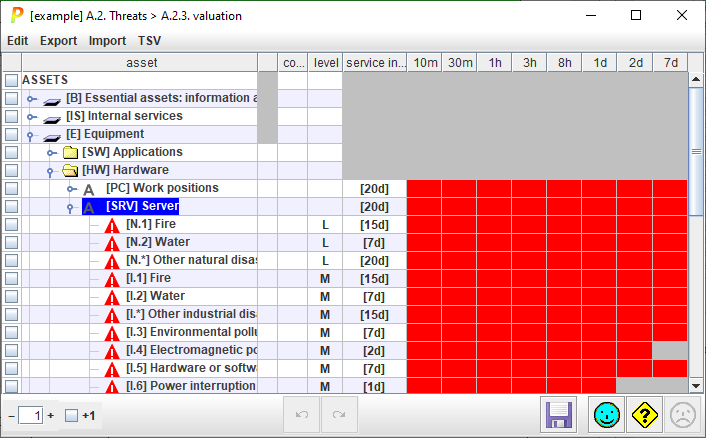
Table columns

|
1 |
selection |
Click on checkboxes to check / uncheck. SHIFT-click to check a range. Click on column header to clear current selection. Selection control whole rows to apply TSV (see [1]) or clear (see [16]) |
|
2 |
asset |
Assets and threats. |
|
3 |
|
shows the mode of each asset / threat:
In mix mode, click to change |
|
4 |
level |
This column presents likelihood. The format is decided at [[Options / Likelihood]]. |
|
5 |
|
interruption interval |
|
6 |
|
Graphical display of the interruption time |
Bottom toolbar

|
|
Spinner to control the expansion of the assets tree. |
|
+1 |
Adjust the effect of the spinner. If +1 is checked, PILAR shows the threats associated to an asset. If unchecked, the threats are not expanded. |
|
|
Undo last changes. |
|
|
Redo last undone changes. |
|
|
Saves current project either in its file, or in its database. |


NOTE. If [[Options / Threats]] are set to automatic, then some buttons are disabled:
- copy & paste
- import from XML
- clear
- undo / redo