|
Creates a new asset. See “Edit one asset”. |
|
|
new asset / new asset group |
Creates a new asset group (a directory). See “Edit one asset”. |
|
new asset / duplicate asset |
A new asset is created, using as initial contents that of another asset. You have to edit the new asset and, at least, change the code that must be unique. See “Edit one asset”. |
|
copy |
Takes one or more assets to be duplicated
later on. |
|
cut |
Extracts one or more assets from the tree, to be pasted later on. |
|
paste |
Pastes the assets that were cut into a new place in the tree. |
|
edit |
See “Edit one asset”. |
|
merge assets |
Select two or more assets and merges them by adding asset classes. You have to edit the new asset and, at least, change the code that must be unique. See “Edit one asset”. |
|
description |
Jumps directly to the long description for the selected asset. |
|
security domain |
Changes the selected assets into a security domain. |
|
information sources |
Assigns one or more information sources to the selected assets. |
|
sort / [a..z] … |
The selected assets are sorted alphabetically, by code. |
|
sort / … [A..Z] |
The selected assets are sorted alphabetically, by name. |
|
sort / undo |
Undoes the last sorting operation; that is, return to the original order. |
|
asset / group / be group! |
Changes the selected assets from plain assets into asset groups. |
|
asset / group / don’t be group! |
Changes the selected assets from asset groups into plain assets. |
|
delete / delete children |
Removes the children of the selected assets. |
|
delete / delete asset |
Removes the selected assets, and their children. |
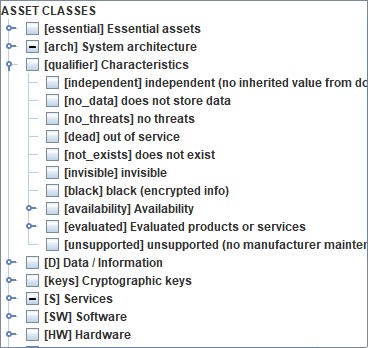
Previous versions included some asset qualifiers. These qualifiers are moved onto asset classes
|
independent |
the asset does not inherit values from the essential assets in the domain |
|
no_data |
the asset does not store data (some threats are not applicable) |
|
no_threats |
You may mark an asset as threat-free, or subject to threats. |
|
dead |
the asset is out of service. You may stop / restart an asset. It only affects availability. |
|
not_exists |
You may enable / disable an asset. If it does not exist, it is ignored for the risk analysis. |
|
invisible |
You may hide an asset from presentation screens. |
|
black |
data in this asset is encrypted (some threats do not apply) |
|
availability |
tunes the impact on availability |
|
evaluated |
the product or services is evaluated or has a security accreditation |
|
unsupported |
the manufacturer no longer provides security patches |
To
insert a new asset
§ select one layer | one asset
§ menu assets / new asset / new asset
or
§ select one layer
§ right click / new asset
or
§ select one asset
§ right click / new asset / new asset
To insert a new group of assets
§ select one layer | one asset
§ menu assets / new asset / new asset group
or
§ select one layer
§ right click / new asset group
or
§ select one asset
§ right click / new asset / new asset group
To
insert an asset that duplicates another one
§ select one asset
§ menu assets / new asset / duplicate asset
or
§ select one asset
§ right click / new asset / duplicate asset
To
edit an asset
§ select one asset
§ menu assets / edit
or
§ select one asset
§ right click / edit
To
add a long description to an asset
§ select one asset
§ menu assets / description
or
§ select one asset
§ right click / description
or while editing the asset
To
place an asset into a security domain
§ select one asset
§ menu assets / domain / select / OK
or
§ select one asset
§ right click / domain / select / OK
or while editing the asset
To associate one asset to sources of information
§ select one asset
§ menu assets / information sources / select / OK
or
§ select one asset
§ right click / information sources / select / OK
or while editing the asset
To
transform a plain asset into a group
§ select one asset
§ menu assets / asset-group / be group
or
§ select one asset
§ right click / asset-group / be group
To
transform a group of assets into a plain asset
§ select one asset
§ menu assets / asset-group / do not be group
or
§ select one asset
§ right click / asset-group / do not be group
To
remove one asset (and the member of the group if any)
§ select one asset
§ menu assets / delete / delete asset
or
§ select one asset
§ right click / delete / delete asset
or
§ select one asset
§ click DEL
To
remove the members of a group
§ select one asset
§ menu assets / delete / delete children
or
§ select one asset
§ right click / delete / delete children
To
move one asset to another place in the tree
§ drag & drop
§ cut & paste
or
§ SHIFT + UP_ARROW: to move up, before the previous one
- SHIFT + DOWN_ARROW: to move down, after the next one
- SHIFT + LEFT_ARROW: to move left, brother(s) of the current father
- SHIFT + RIGHT_ARROW: to move right, son(s) of the current elder brother