
|
1 |
|
Selection |
|
2 |
aspect |
See “Safeguards / Aspect”. |
|
3 |
top |
|
|
4 |
recommendation |
It is a rank in the range [null .. 10], estimated by PILAR considering the assets, the security dimensions, and the level of risk addressed by this safeguard. The cell is grey if PILAR finds no reason to recommend this safeguard. That is, PILAR does not know which risk this safeguard is good for. (o) - PILAR thinks it is an overkill (“too much”). (u) - PILAR thinks it is an under-kill (“not enough”). Right-click to open a new window with a summary of the rational for the recommendation; that is, the assets and dimensions to which the safeguard will apply. |
|
5 |
traffic light |
See “Safeguards / Reference and target phases” below. |
|
6 |
|
Safeguards tree. You double click to collapse / expand the tree. You may right-click to access to “Safeguards / tree”. |
|
7 |
doubts |
Click to mark / unmark the row. The mark is typically used to remember that there are issues waiting for an answer. The mark “floats” to the top level to highlight the problem. |
|
8 |
sources |
Click to associate information sources to the safeguard and its children. |
|
9 |
applicability |
All safeguards apply by default. Nevertheless, you may mark safeguards as not applicable. It implies that PILAR will ignore them. Ignoring safeguards is somehow risky in the sense that you may inhibit PILAR from working with measures that are useful. Non-applicability shall be justified, and the reason recorded as a comment. |
|
10 |
comment |
Click to associate comments to the safeguard. |
|
… |
|
Project phases. See “Safeguards / Maturity valuation” below. |
· left click
o to select / unselect; if a countermeasure is marked as not applicable, all of its children become not applicable; if some children apply and some do not, the countermeasures above are marked as “…”.
· right click
|
clear |
remove all applicability marks |
|
recommendation |
follows recommendation; that is all safeguards that are not recommended are marked as n.a. |
|
only if … |
retains only safeguards mapped from one or more security profiles |
|
n.a. |
mark every safeguard as n.a. |
|
push down values |
applicability is copied to other security domains under current one |
|
copy |
applicability values are copied from security domain above |
Example. If we have 2 security domains: A on top of B, then
· when presenting A, push-down-values translates applicability values from A to B
· when presenting B, copy translates applicability values from A to B
Applicability stages
When there are more than one applicability stages, the previous options apply independently to each one. You will have a column for each stage, while the current stage is highlighted in blue
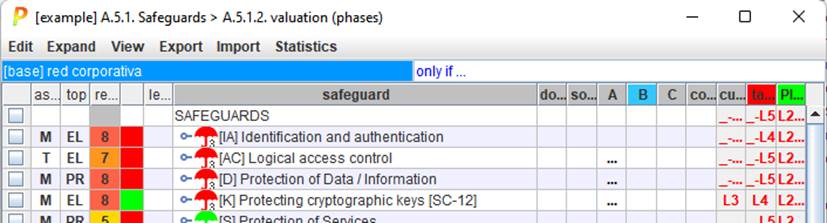
You may click on applicability stage headers to select the current one.